Social Media Image Sizes 2026: The Complete Guide to Specs, Safe Zones, and Pro Tips
Key Takeaways
- You’ll get current, platform-by-platform image dimensions, aspect ratios, file limits, and safe-zone guidance for Facebook, Instagram, X, LinkedIn, Pinterest, YouTube, TikTok, Snapchat, Threads, and blogs.
- You’ll learn reliable “evergreen” aspect ratios that protect your visuals from unexpected crops or UI overlays across devices.
- You’ll discover export settings (sRGB, WebP/JPEG/PNG), compression targets, and naming workflows to keep your team fast and consistent.
- You’ll find design-safe areas for Stories, Reels, Shorts, and banners so text and faces never sit under buttons or captions.
- You’ll get an edited archive of the original 2020 cheat sheet for historical reference, clearly labeled and superseded by updated 2026 specs.
Every platform crops differently, compresses differently, and changes more often than any of us would like. If you're creating images for a school, family business, PTA campaign, or a growing brand, the right dimensions and safe zones mean sharper photos, fewer cut-off faces, and better reach. Use this guide to size once, export right, and post with confidence in 2026.
The 2026 Social Media Image Size Cheat Sheet
Facebook (Meta)
- Profile photo: Upload 640×640 or 800×800 (displays ~170×170 on desktop, circular crop). Keep important content centered.
- Page cover (desktop/mobile): Desktop displays ~820×312; mobile ~640×360. Upload 1640×624 for crispness; keep text/logos within the center 640×312 “safe” band.
- Group cover: 1640×856 (approx. 1.91:1). Keep key content centered to avoid mobile crop.
- Event cover: 1200×628 (1.91:1).
- Shared image/link preview: 1200×630 (1.91:1).
- Stories/Reels: 1080×1920 (9:16). Avoid the top 250 px and bottom 250 px to keep UI from covering text.
- Formats/limits: JPG/PNG/WebP; keep under 2–3 MB for faster loads. Use sRGB.
- Profile photo: Upload 320×320 or larger (circular crop).
- Feed posts:
- Square: 1080×1080 (1:1).
- Portrait: 1080×1350 (4:5) — best for vertical screen real estate.
- Landscape: 1080×566 (≈1.91:1).
- Carousels: Keep a consistent ratio across all slides (1:1, 4:5, or 1.91:1).
- Stories/Reels: 1080×1920 (9:16). Keep titles/logos within the middle 1080×1350 zone for safer crops.
- Reel cover: 1080×1920; grid crops to 1:1 — center the focal point.
- Formats/limits: Photos up to ~30 MB; JPG/PNG/WebP. Use sRGB, export high quality and compress lightly.
X (formerly Twitter)
- Profile photo: 400×400.
- Header: 1500×500 (wide banner; keep text in the horizontal center).
- In-stream single image: 1200×675 (16:9) recommended; vertical (e.g., 1200×1600) is supported and often fully displayed in-feed.
- Link cards: 1200×628 (1.91:1).
- Formats/limits: JPG/PNG/WebP; GIFs supported. Typical max ~5 MB on mobile, up to ~15 MB on web for images.
- Personal profile photo: 400×400 minimum (upload 800×800+ for clarity).
- Personal background/cover: 1584×396 (very wide; center key elements).
- Company logo: 300×300.
- Company cover/banner: 1128×191 (wide; keep text in center).
- Shared image: 1200×1200 (square) or 1200×627 (horizontal link share).
- Event cover: 1200×628.
- Formats/limits: JPG/PNG/WebP; aim under 3 MB; sRGB.
- Profile photo: 800×800 (displays smaller).
- Standard Pin: 1000×1500 (2:3) — Pinterest's most reliable ratio.
- Square Pin: 1000×1000 (1:1).
- Long Pin: Up to 1000×2100 (≈1:2.1). Longer can be truncated.
- Board cover: 800×450 (16:9) common; platform may crop depending on layout.
- Formats/limits: JPG/PNG/WebP; keep under ~2–3 MB for faster loading.
YouTube
- Channel banner: 2560×1440. Critical safe area: center 1546×423 (visible across devices).
- Channel icon: 800×800 (displays ~98×98).
- Video uploads: 1920×1080 (16:9) preferred; minimum 1280×720. 4K supported (3840×2160).
- Shorts: 1080×1920 (9:16). Keep text away from bottom third where captions/actions appear.
- Thumbnails: 1280×720 (min width 640), 16:9, under 2 MB, JPG/PNG/GIF; high contrast and readable text.
TikTok
- Profile photo: 720×720.
- Video: 1080×1920 (9:16). Avoid top ~230 px and bottom ~150–250 px where UI elements can overlap; keep headlines centered.
- Cover thumbnail: 1080×1920; profile grid often crops to 1:1 — center the focal area.
- Formats/limits: MP4/MOV for video; JPG/PNG/WebP for cover. Keep images under a few MB for speed.
Snapchat
- Snaps/Spotlight/Ads: 1080×1920 (9:16).
- Geofilters/overlays: 1080×2340 transparent PNG; keep under ~300 KB; avoid covering faces/UI.
Threads (Meta)
- Profile photo: 320×320 (circular crop; mirrors Instagram).
- In-feed images: 1080×1350 (4:5) recommended; 1:1 and 16:9 also supported. Keep text away from edges for multi-device cropping.
Blogs, Websites, and Link Previews
- Featured image (on-page): Common options include 1200×800 (3:2), 1200×900 (4:3), or 1600×900 (16:9). Match your theme's aspect ratio.
- Open Graph (Facebook/LinkedIn): 1200×630 (1.91:1). Keep essentials away from edges.
- Twitter/X card: 1200×628 (1.91:1) for summary large image.
- Square social share: 1200×1200 (1:1) for platforms that prefer square previews.
- Best practice: Export one master OG at 1200×630 and a square at 1200×1200 for wider compatibility.
Evergreen Ratios and Safe-Zone Rules
- Horizontal/link previews: 1.91:1 (e.g., 1200×628/630) works reliably on Facebook, LinkedIn, and X.
- Square posts: 1:1 (e.g., 1080×1080 or 1200×1200) is the safest “one-size-fits-most” for feeds and multi-image layouts.
- Vertical stories/reels/shorts: 9:16 (1080×1920). Keep key text/logos within the central 4:5 box (approx. 1080×1350) to avoid UI overlaps and device crops.
- Banners: Always leave generous horizontal padding; never anchor text to corners. Assume 5–10% crop on each side across devices.
Pro Design Standards, Formats, and Export Settings
Color and profile
- Work in sRGB and export in sRGB to avoid dull, shifted colors on web/mobile.
- Use high contrast and accessible color combinations; check legibility on small screens.
File formats
- WebP: Best balance of quality and file size for most photos/graphics.
- JPEG/JPG: Great for photos; export at 75–85% quality and keep under ~300–500 KB when possible.
- PNG: Use for logos, text on flat color, or transparency. Watch file size.
- GIF: Use sparingly; video (MP4) is usually smaller and cleaner for motion.
Sharpness and compression
- Export at the exact pixel size whenever possible; avoid platform upscaling.
- Run a lossless pass (e.g., ImageOptim, Squoosh) to shave extra KB without visible loss.
- Aim to keep feed images under 1 MB (ideally under 500 KB) for faster delivery.
Focal points and cropping
- Center faces and headlines; leave at least 5–8% safe padding on all sides.
- For vertical video, keep the face or product within the central third for better auto-cropping in feeds and previews.
A Faster Workflow Your Team Can Stick To
- Start with master artboards: 1:1 (1080×1080), 4:5 (1080×1350), 1.91:1 (1200×628), 9:16 (1080×1920), and your banner sizes (YouTube 2560×1440, Facebook 1640×624).
- Use smart layers: Keep logos, captions, and footers in consistent positions across sizes.
- Name consistently: brand_campaign_platform_ratio_version (e.g., “eagles-pta-bookfair_ig_4x5_v2.webp”).
- QA checklist: Test on one small phone and one large phone; preview on desktop dark mode; verify no text sits under UI/captions.
- Accessibility: Add alt text, sufficient contrast, and readable font sizes (minimum 36–48 px for overlays on mobile).
Archived 2020 Cheat Sheet (Edited for Clarity — Now Superseded)
Note: The content below preserves the original guidance, with grammar and clarity edits. Specifications have changed since 2020. Always use the updated 2026 sizes above for current posts.
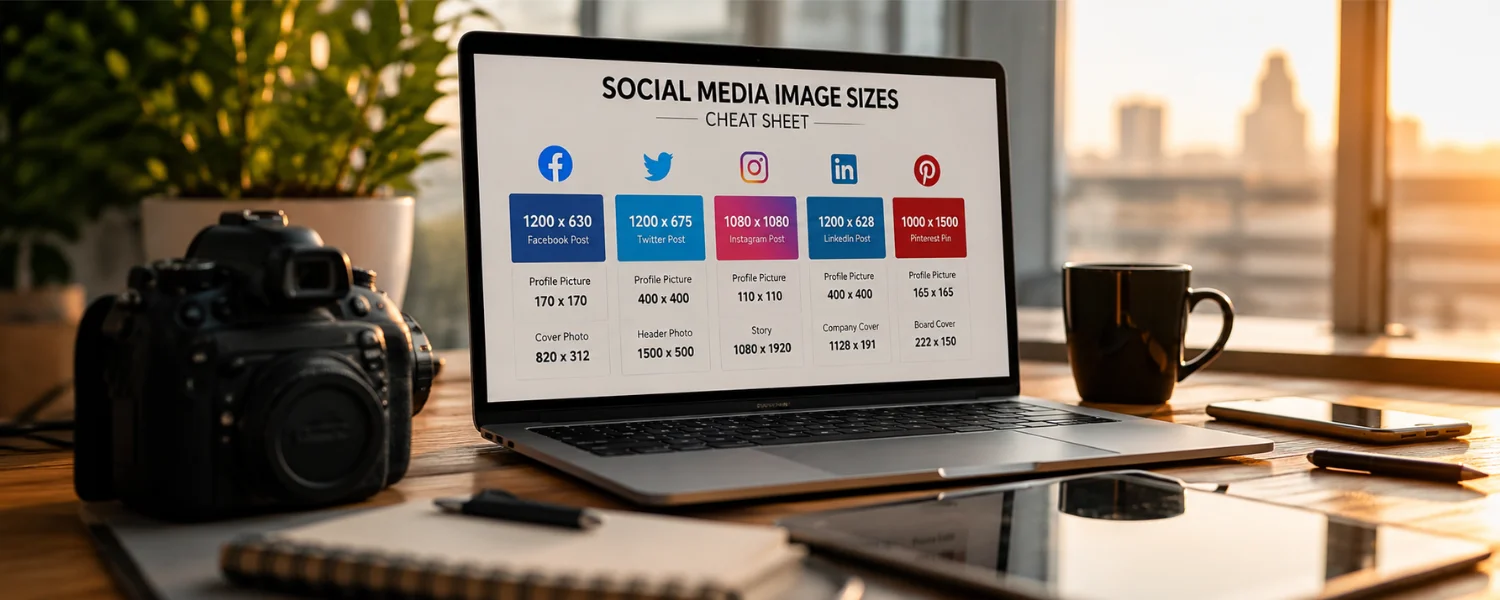
With the rapidly changing nature of social media, image sizes go hand in hand with that movement. It's vital to keep up with what dimensions are supported by each platform (Facebook, Instagram, Twitter, Pinterest, YouTube, as well as blogging sites), and to adapt to these changes. Using the wrong dimensions can negatively affect your posts. The need for a strong social media presence only continues to increase, which is why you need to be constantly learning and adapting to the demands of social media. The ideal image sizes for social media vary between platforms. This infographic showcases the different dimensions required by each platform and helps you meet all your social media posting needs.
- Complete Guide to Social Media Image Sizes
- Blog: Featured images — 600×900 px
- Facebook: Profile image — 180×180 px; Cover images — 851×315 px; Shared image — 1200×630 px
- Pinterest: Profile image — 165×165 px; Board display image — 222×150 px; Preview image — 51×51 px; Pin images — 236 px width
- Instagram: Profile image — 110×110 px; Board (feed) image — 1080×1080 px
- Twitter: Header image — 1500×500 px; Profile image — 400×400 px; In-feed image — 440×440 px
- YouTube: Channel cover — 2560×1140 px; Video uploads — 1280×760 px; Display sizes: Tablet (1855×423), Mobile (1546×423), Desktop (2560×423)